I honestly didn’t expect to be asking that question.
Photoshop has long been my first choice for removing unwanted people and objects from photographs. However, after testing the updated Clean Up tool in Apple Photos, I got results that weren’t simply comparable to Photoshop—they were noticeably better.
To find out whether this was a one-off, I put Apple Photos and Photoshop through three increasingly difficult tests.
Apple Photos Clean Up vs Photoshop Remove Tool
For the Photoshop edits, I used the Remove Tool with its mode set to Auto. This allows Photoshop to decide whether to use generative AI, Content-Aware technology or another method to fill the selected area.
For Apple Photos, I used the Clean Up tool on my iPhone, selecting the High Quality option. The same technology is also available in the desktop version of Apple Photos.
In both applications, I made quick, rough selections around the people I wanted to remove. I wasn’t attempting to produce perfect selections or spend time manually tidying the results. The aim was to see what each application could produce on its own.
Test One: Removing People From a Railway Station
The first photograph was taken at Cardiff Central railway station during a World War II-themed portrait shoot.
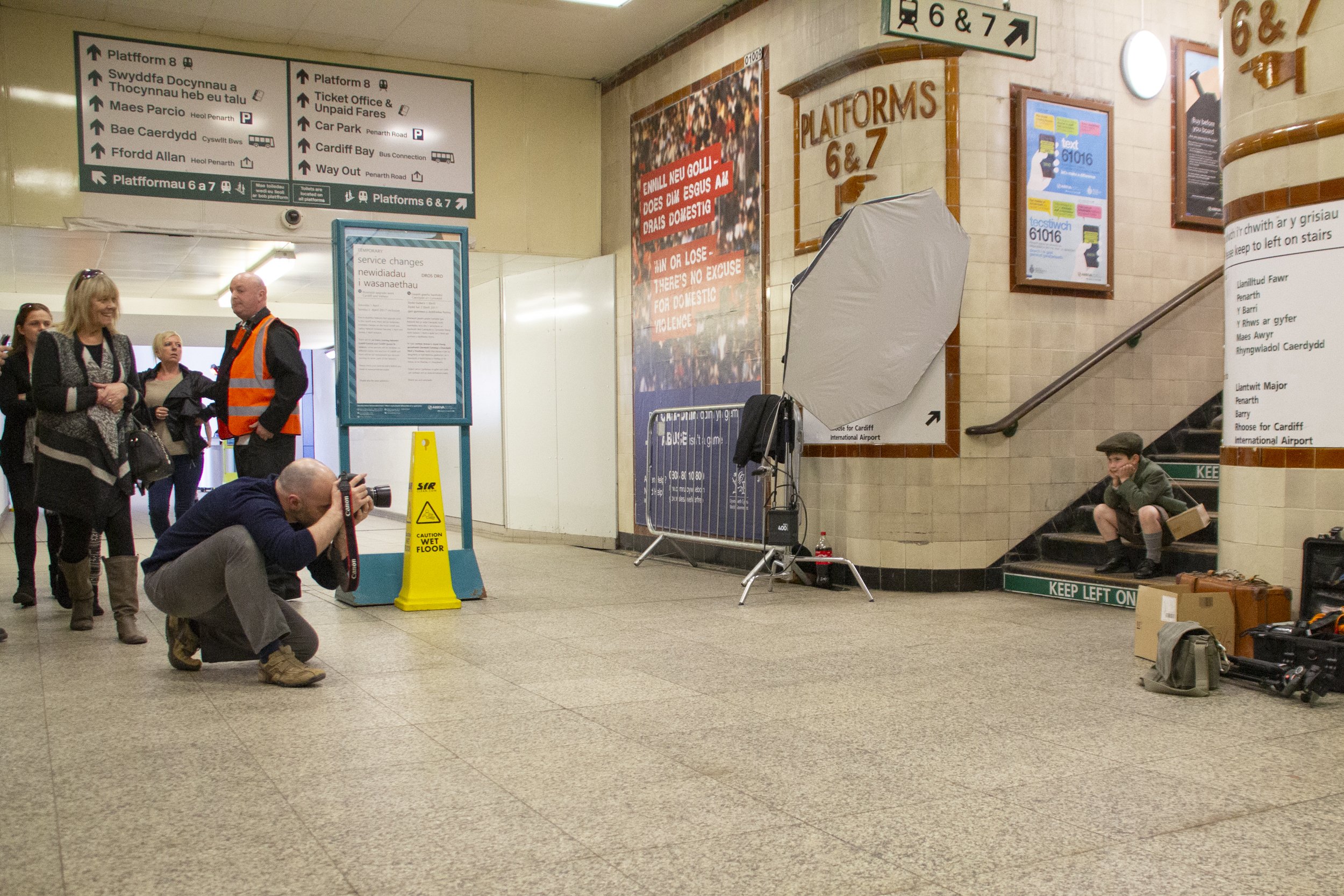
Original
I wanted to remove a group of people on the left-hand side of the frame. This meant the software needed to rebuild part of the station interior behind them.
Photoshop took almost a minute to process the removal. From a distance, the result looked acceptable. It had reconstructed much of the background and hadn’t caused too much damage to the surrounding areas. However, closer inspection revealed several areas that would need tidying.
Apple Photos completed the same task in around five seconds.
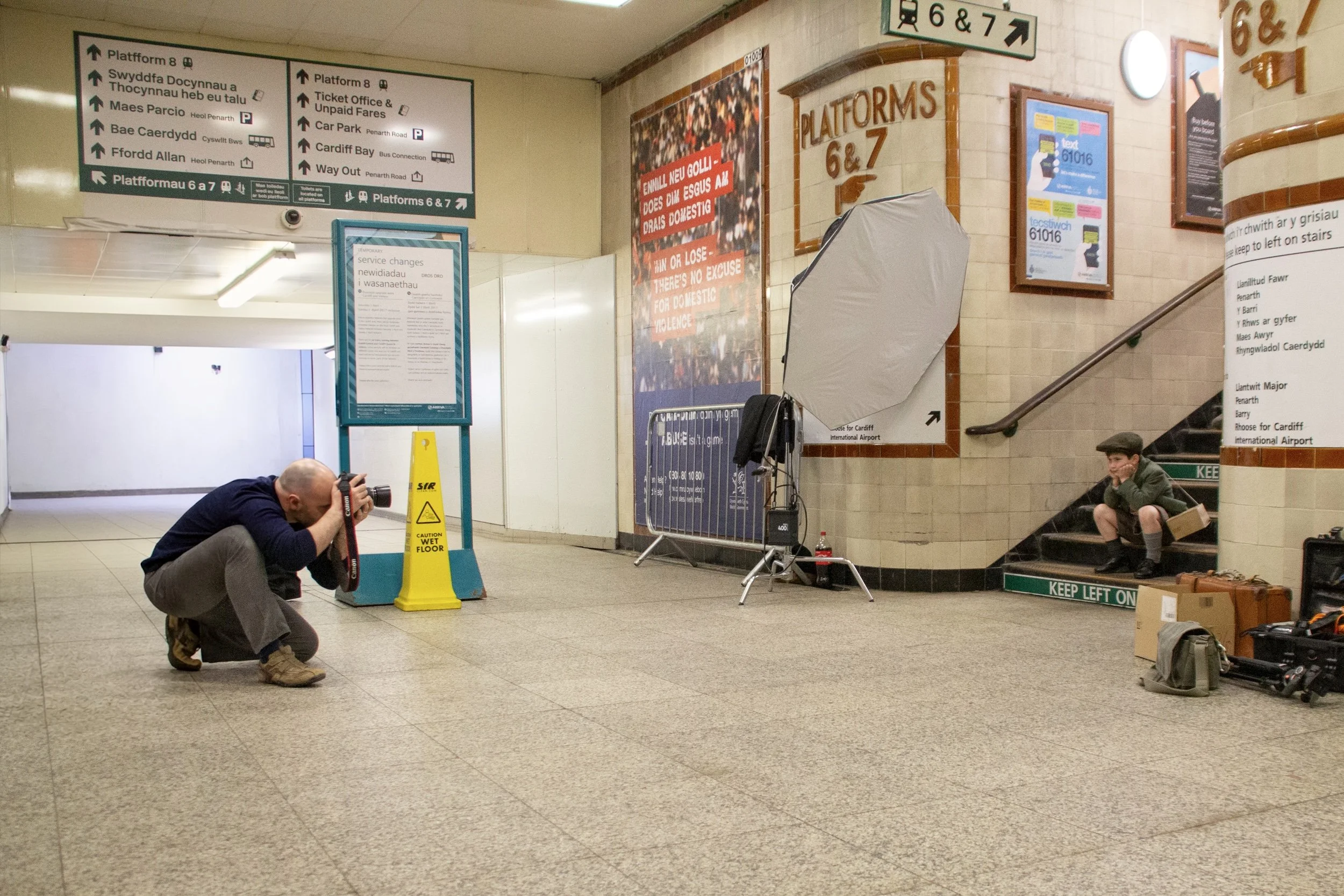
Clean Up using Apple Photos
The result was much cleaner. It reconstructed the background convincingly, removed distracting marks and shadows from the floor and created a space that genuinely looked as though you could walk through it.
It was an impressive start for Apple Photos—but the next test was considerably harder.
Test Two: Rebuilding a Complex Event Backdrop
The second photograph showed me standing with Carly from BenQ at the Wex Summer Roadshow.
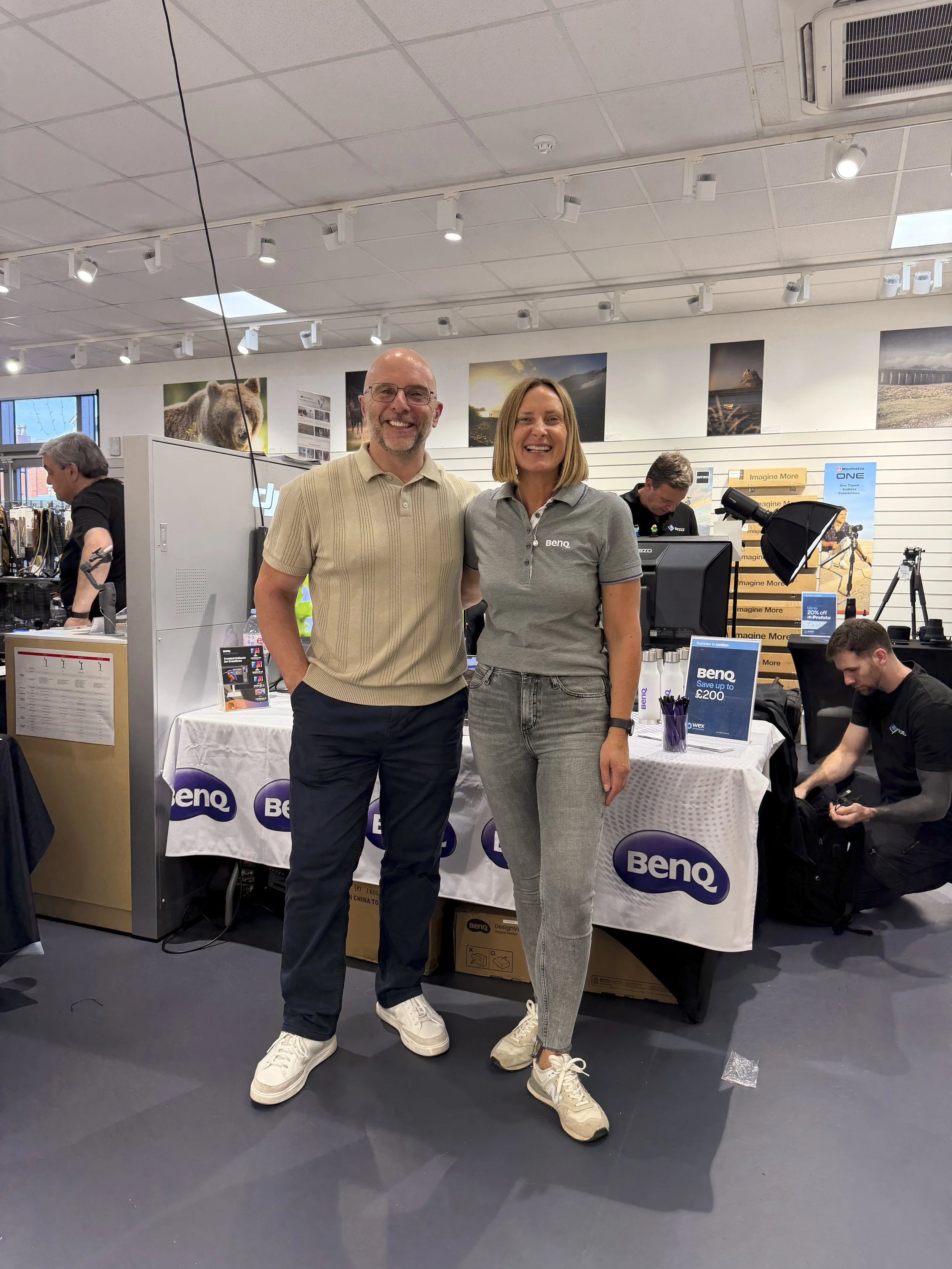
Original
Removing both of us meant rebuilding a large section of the image, including a branded backdrop, a table, several logos and objects in the background.
Photoshop initially produced a result that looked quite impressive. It managed to recreate several BenQ logos and parts of the display. However, the longer I looked at the image, the more problems appeared.
Some of the logos were distorted, the table didn’t make complete sense and Photoshop had created several strange objects in the background. It had filled the empty space, but the result would require a fair amount of additional work.
Apple Photos took approximately 15 seconds to complete the same removal.
The difference was remarkable.
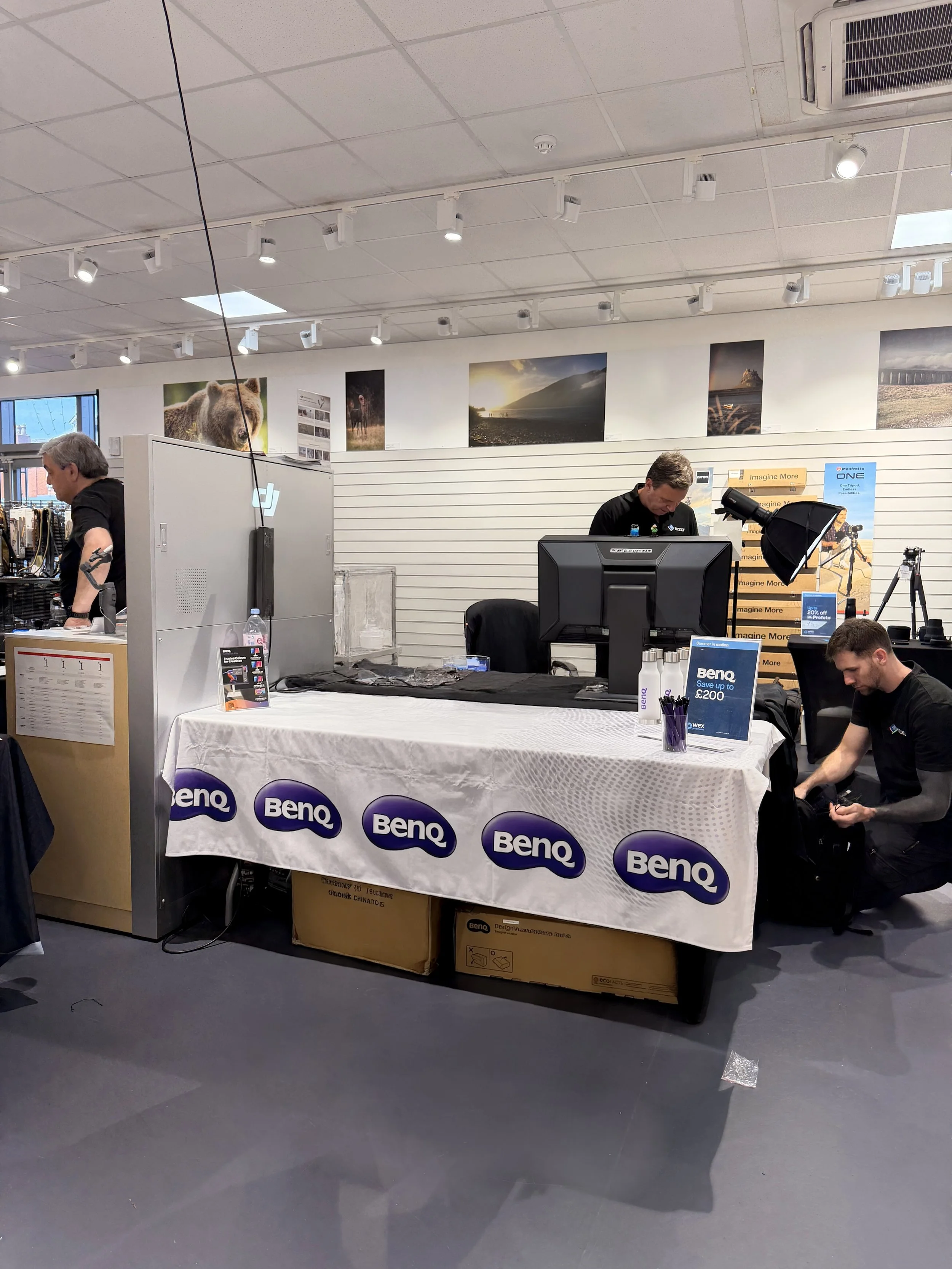
Clean Up using Apple Photos
The backdrop was clean, the logos were correctly positioned and the table had been rebuilt without an obvious join. It also reconstructed the wall and background pictures convincingly without duplicating random objects.
In this example, Apple Photos was the clear winner.
Test Three: An Almost Impossible Removal
The final photograph was the toughest test.
It showed me with Harry, a potter I photographed for my I Am Lyme project. Between us, we covered a large part of the frame, leaving the software with very little visible background to use as a reference.

Original
Photoshop filled the space, but the result looked confused. It repeated objects, created strange shapes and produced an area that became less convincing the longer you examined it.
Apple Photos produced something completely different.

Clean Up using Apple Photos
It reconstructed the trolley behind us, including one of its legs and a wheel. It also created a believable continuation of the workshop wall, complete with pots, tools and other details that matched the surrounding environment.
Was every generated detail an accurate reconstruction of what was really there? Of course not. Neither application can see through people to reveal the original background.
What mattered was whether the generated result looked believable—and the Apple Photos version did.
Looking at the Results Side by Side
After completing all three tests, I transferred the Apple Photos versions to my computer and compared them directly with the Photoshop edits.
The first Photoshop result was acceptable, but the Apple version was cleaner.
The second comparison wasn’t particularly close. Apple Photos handled the branded backdrop, table and background objects far more convincingly.
The third result was the most surprising of all. Photoshop appeared to fill the space with repeated textures and objects, whereas Apple Photos created a much more coherent scene.
Across these three photographs, Apple Photos consistently produced the better result.
Does This Mean Apple Photos Is Better Than Photoshop?
Not as an overall photo editor.
Photoshop remains an incredibly powerful application with an enormous range of professional editing, retouching, compositing and creative tools. Apple Photos isn’t going to replace it in my workflow.
However, when it comes to these specific removal tasks, Apple Photos’ Clean Up tool was better than Photoshop’s Remove Tool—and in some cases, it was considerably better.
It was also incredibly easy to use. I simply traced around the subjects with my finger, tapped Clean Up and waited a few seconds.
Questions About Resolution and Cost
There are still a couple of areas I want to investigate further.
The first is resolution. An image can look convincing on a phone or computer screen, but printing it is a much more demanding test. I’d like to see how much genuine detail the Clean Up tool generates and how well those reconstructed areas hold up in a physical print.
The other consideration is cost. Apple has indicated that some server-based AI features may have usage limits, with expanded access potentially becoming available for a fee. How that develops—and what it might eventually cost—remains to be seen.
Final Thoughts
Three photographs can’t tell us how these tools will perform in every possible situation. Different images, backgrounds and lighting conditions will inevitably produce different results.
But in these tests, particularly the two most challenging removals, Apple Photos was clearly ahead.
The results were clean, convincing and produced in seconds with nothing more than a rough selection made using my finger.
I never expected to say this, but Adobe genuinely needs to step things up.
Watch the video to see the full editing process and all three comparisons, then let me know what you think. Were you as impressed by the Apple Photos results as I was?