The New York Times has told its contributing photographers not to use the latest version of Photoshop on assignments, because it can mark their pictures as AI generated. I tested it, and in my tests it wasn't Photoshop doing it; it was Lightroom.
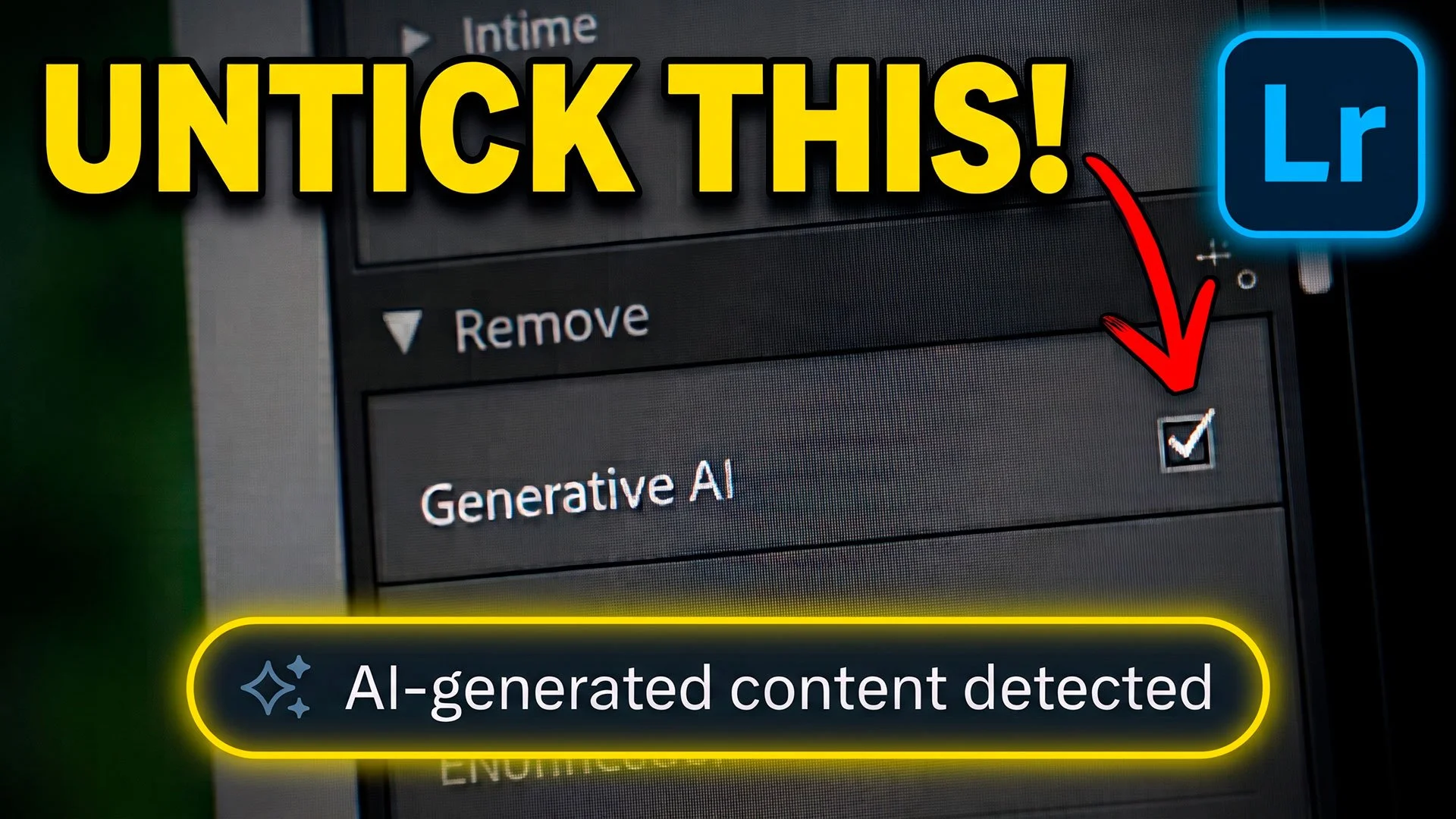
In Lightroom I used the Remove tool with Generative AI ticked to take one tiny distraction out of a picture, exported it without Content Credentials attached, and put it up on X. X flagged it straight away as "AI-generated content detected".
Where this came from
On the 24th November, The Verge and PetaPixel both reported on a memo from the Times to its contributing photographers; Emma Roth wrote it up for The Verge and Jeremy Gray for PetaPixel, and DPReview covered it as well. The memo itself was posted publicly on Threads.
A Times spokesperson, Graham James, confirmed that contributing photographers have been told to avoid Photoshop 2027, so that's version 28.0.0 and later, on Times assignments. The reason given is that some of its functions use generative AI "in ways that may not be apparent to users" and can result in metadata identifying photographs as AI generated.
Why a tiny cleanup carries a record at all
When you use certain generative tools, Adobe attaches a little record to the file. It's called Content Credentials and the underlying standard is C2PA, but in plain words it's a note that travels with your photo saying what made it and what changed it.
Adobe says qualifying generative tools add this record on their own and you can't turn it off, and they tie it to transparency laws such as California's AI Transparency Act. To be fair, that's exactly what Content Credentials are there for.
What Adobe doesn't do is publish a list of which tools qualify, so you can't tell from a list whether a simple fix like Remove counts. A post from Adobe's community manager on the 21st October made the point that the generative AI record is mandatory, and the Content Credentials option on export only covers the optional credentials, not the AI record underneath. That's why leaving it unticked made no difference to my Lightroom file.
Checking your own files
There are two places to look.
The first is inside Photoshop, under Window > Content Credentials, where the beta panel shows you what's attached to the document you've got open. File Info won't show you this, because the record lives in its own separate block.
The second is after you've exported, and that's Adobe's Inspect tool at contentauthenticity.adobe.com/inspect. An untouched file dropped in there says "We couldn't verify how this was made", so that's your baseline for a clean one.
The three tests
I ran these in Photoshop 28.0 and Lightroom 10.0.
Test one was Remove in Lightroom with Generative AI ticked, a small distraction taken out, exported without Content Credentials. Inspect showed AI was used and even named the Remove tool.
Test two was the same kind of fix in Photoshop, Remove with generative AI on, exported as a JPEG or a PNG. The Content Credentials panel had nothing in it, and Inspect said it couldn't verify how the file was made, so it came back looking exactly like the untouched one. I repeated it on images opened straight in Photoshop rather than sent over from Lightroom and got the same result.
Test three was for comparison; a small selection and Generative Fill in Photoshop. Generative Fill is a different sort of tool because it can add things into a picture that weren't there originally, so a record on that one seems fair enough, and it got one. The panel flagged it straight away and Inspect showed Adobe Firefly and Generative Fill.
So the same kind of remove leaves a record saying AI was used when it's done in Lightroom, and leaves nothing when it's done in Photoshop, which is the opposite of what the Times memo points at.
What the platforms did with them
X flagged the Lightroom file as "AI-generated content detected", and neither of the Photoshop files got a label, not even the Generative Fill one
Instagram labelled none of them
LinkedIn showed a "Content credentials attached" notice on upload for the Lightroom file and the Generative Fill file, with no mention of AI, and nothing for the Photoshop Remove file
That's what I saw on my end as of today. Each platform clearly reads these records its own way, and nobody has explained why.
The X result is the one that bothers me. Say you've photographed a bird and there's a little twig in the frame, so you tidy it up with Remove in Lightroom with Generative AI ticked. That photo then goes online marked as AI generated content, which is wrong, because the picture wasn't made with AI. Somebody who's generated an entire image from start to finish gets exactly the same label, with nothing to show how much AI is actually in each one.
The simple fix
Adobe does give you the switch for it. In Lightroom it's a single tick box, so if it's a small fix and you don't want that label, untick Generative AI in Remove. In Photoshop, set generative AI to off in the options bar rather than leaving it on auto. My Photoshop remove didn't leave a record anyway, but I'd do it just to be safe. You've also got the tools that aren't generative at all, like Spot Healing and the Clone Stamp.
If you supply editorial or stock work, or you enter competitions, it matters even more, so do check the rules. The Times is now one example, Reuters, AP and Getty already ban or limit generative edits on editorial work, and competition rules vary quite a bit.
Adobe's material points to other generative tools too, things like Generative Expand, Generative Upscale, Harmonize, Relight and Remove Related Elements. I didn't test those, so I'm not claiming anything about them.
Stripping the credentials out isn't the answer either; Adobe's guidelines forbid it. Carrying a record and being labelled are two separate things, a platform might show it or it might not, and that can change without any warning, so I'd much rather know exactly what my file says about my picture before somebody else reads it.