tutorial

SKIN RETOUCHING: How to fix Sunburn Skin FAST and EASY with Photoshop

If only it was this quick and easy in real life to get rid of sunburn. Alas no, but here's a super fast and easy skin retouching technique for dealing with sunburnt skin in your pictures using Photoshop. Everything is done with just one Hue/Saturation adjustment layer, so there's very little to it and nothing complicated to remember, which makes it an easy one to add to your own retouching.

Perfect Eyes with Photoshop Neural Filters (Video Tutorial)

Ok so yesterday I shared a new video on my YouTube Channel going through a recent-ish photo shoot I had with a female surfer.

In the video I go through a Behind the Scenes showing what went into making the picture whilst on location but then show how just one slider in Photoshop made the final picture, I believe, a winner.

As is always the case, it’s the small things that make the BIG difference in Photography and Retouching, and that’s exactly where the Neural Filters in Photoshop comes in when used sparingly.

You’ll see what I mean in the video but also, and I think importantly, why the filter had to be used in the first place.

Cheers,
Glyn

So often it's the small things that make the big difference in photography and retouching. This video takes you through a photo shoot I had with a female surfer, starting behind the scenes on location to show what went into making the picture. From there I do a quick edit using the selections and masking in Lightroom to bring the sky and the sea to life, then show how just one slider in Photoshop's Neural Filters changed the direction of her eyes. Used sparingly, that small change made the final picture, and I also explain why the filter had to be used in the first place.

My NEW Frequency Separation Action (How to Use)

My NEW Frequency Separation Action (How to Use)

A while back now I did a LIVE Stream on my YouTube Channel showing how to use the incredible Frequency Separation Technique; without doubt the most useful technique to learn and use in Photoshop.

Following the LIVE Stream I then created an Action to help automate the process and made this available for free as a download to folks who joined my email community / newsletter.

However, if I’m honest, the Action was a little bit clunky in that it worked great when there was a layer in Photoshop called Background OR named a certain way. My Bad!

So, I’ve fixed it, and

Selections and Masking in Lightroom Mobile

After Adobe Max, the internet was on fire with videos about the major update to selections and masking in Lightroom and Camera Raw. What I hadn't realised was that the exact same features had also been added to the Lightroom Mobile app, which is incredible in itself, and even more so when you realise the selections and masks sync with the desktop and web versions of Lightroom. Here I edit a photograph on my phone that was taken on my phone, including selections and masks, all within Lightroom Mobile, for a fully non-destructive workflow.

Fixing Wide Angle Lens Distortion with Photoshop

Using a wide angle lens, as I did when photographing Brentor Church, can cause distortion in the outer areas of your images: the top, bottom and sides. That can be good to keep in some places, such as the foreground, where it emphasises that area, but there may be other areas where you don't want it. Here's how to quickly fix wide angle lens distortion using Photoshop, plus an explanation of why I chose not to do it in Lightroom or Camera Raw.

How to quickly create Autumn using Photoshop

How to quickly create Autumn using Photoshop

I guess we have to accept now (certainly here in the UK) that the summer months are well and truly gone, but without feeling too down in the dumps, there’s the magic of Autumn to look forward to bringing with it a change in the trees to beautiful burnt oranges, yellows and reds.

In the mean time though, if you’re feeling a little impatient, here’s a REALLY quick technique in Photoshop for creating an Autumn scene plus adding in a dreamy glow…

The BEST Image Settings for Facebook

The BEST Image Settings for Facebook

If you’ve ever uploaded one of your pictures onto social media, in particular Facebook, then it’s highly likely you’ll have experienced that crushing feeling when you see how they look. The compression that Facebook applies seems to batter images to the point that they look, well, awful.

However, here’s the settings you can apply in Photoshop that will fix it…

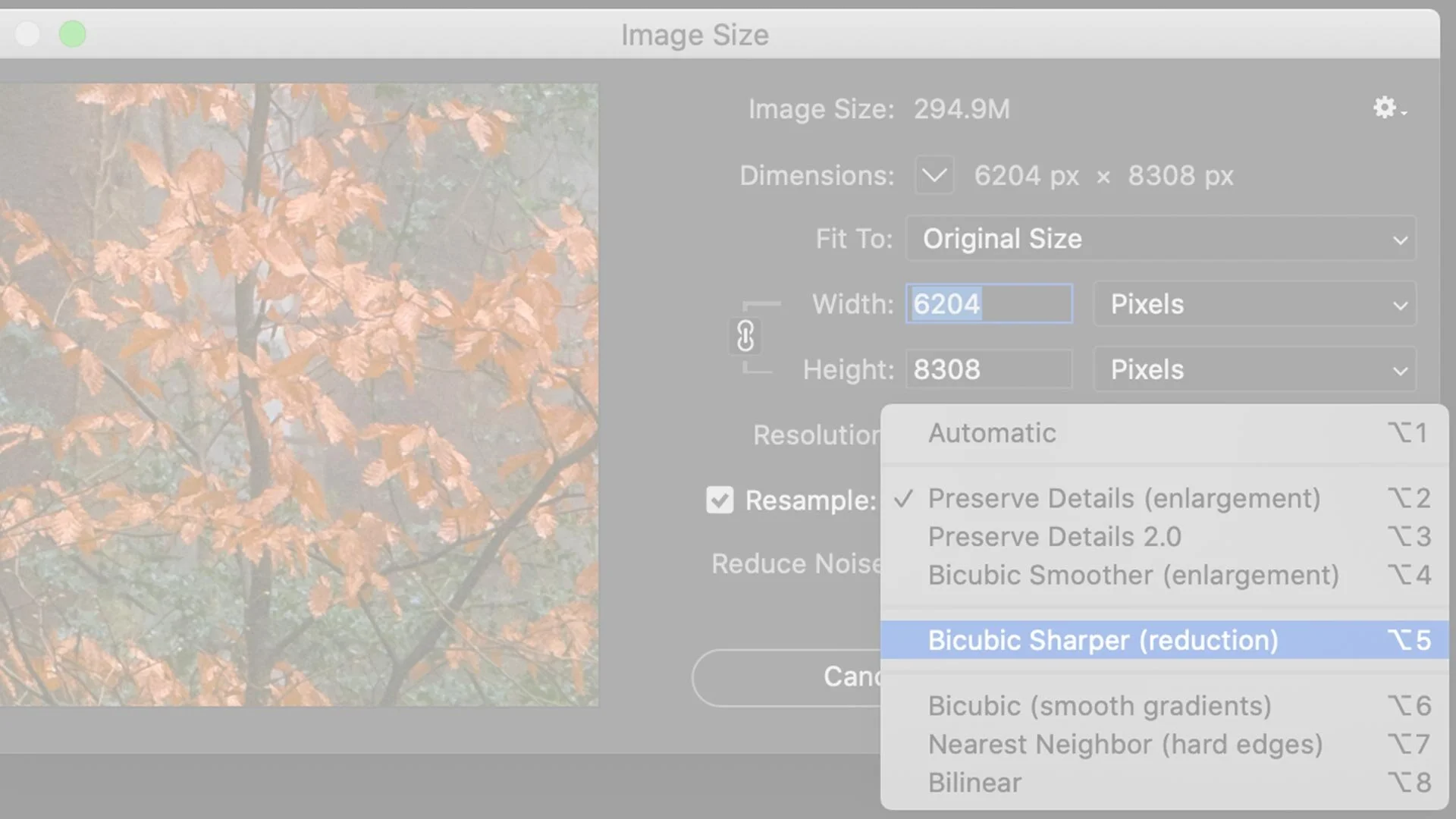
STEP 1 (Image Size)

With your image / picture open in Photoshop go to Image > Image Size

The Photoshop Virtual Summit III

Honestly, I don’t think I’ve ever been involved in an event that has had so much positive feedback and reaction as the previous Photoshop FREE Virtual Summit, so I’m genuinely over the moon to be a part of the next one coming in October of this year.

  • October 4th - October 8th 2021

  • 20 Instructors

  • 30+ Hours of Photoshop Training

This is a completely FREE TO WATCH event so all you have to do is to grab your FREE PASS, and you can do that (and get more information) using the button link below.

Hope to ‘see’ you there,
Cheers,
Glyn

Missing Shapes Fix in Photoshop 2021

Missing Shapes Fix in Photoshop 2021

In my new course, Photoshop Lighting Effects, for one of the techniques I show how to recreate the look of neon lighting.

In addition to text I also use a lightbulb shape, however I have had a couple of messages from people saying they can’t find it. So, rather than share the answer to one person, I thought I’d record a video and share it here so that anyone and everyone can

Subtitles / Captions: Why did I not think of this?

Subtitles / Captions: Why did I not think of this?

Why did I not think of this?

Had a message from someone that had enrolled in my New Photoshop Lighting Effects Course saying that they were Hard of Hearing and asking if there were subtitles / captions they could turn on to help them.

There weren't. I'd completely missed doing that, BUT I'm glad to say I’ve now added them in.

Paid and sent all the video content to Rev who have manually transcribed each one and