news

LIGHTROOM UPDATE (June 2023)

In June 2023 Adobe added some updates to Lightroom Classic and Lightroom Cloud, which includes Lightroom Mobile, so this is a quick run through of the main bits. I look at the changes to Refine Saturation, HSL and Grain, along with the Devices tab and a few other additions. There were also the usual minor updates, including support for new cameras and lenses, but here I've concentrated on the changes that'll make the most difference when you're editing.

Guest Blog Post on Scott Kelby's Photoshop Insider

Really proud to be a Guest over on Scott Kelby’s Photoshop Insider website today ( LINK )

I followed Scott’s blog when I first started out and still do to this day. Back in the day Scott used to run a ‘Motivational’ post every Tuesday and I’ll never forget the morning I started reading as usual and saw that his Tueday post was about me.

We’d not met and become friends at that point but Scott was telling his readers about my work and recommeding they go check it out. That meant a lot!

So much has happened since then and a big motivator of that was and is the support Scott has shown me over the years, so to be back on his blog today is something special for me … it’s kind of where it all started.

Thanks Scott and thanks to Brad Moore for reaching out.

PHOTOGRAPHERS ... STOP USING HDMI to connect your Monitor / Display 😳

Who knew that connecting your computer to your display using HDMI might be the reason your colours look bad and your prints look nothing like they do on screen? Here I explain why. The important thing to know is that it isn't the HDMI cable itself that's the problem, it's the HDMI settings. On some systems, for example with an NVIDIA graphics card, you can go into the settings and change them to give the full range of 0 to 255, but that isn't possible on other systems, including Mac. In that case, I'd advise using an alternative connection between your computer and display, such as USB-C.

NOISE REDUCTION ... Which one is the BEST?

With Adobe releasing Denoise AI noise reduction in Lightroom and Camera Raw, the obvious question was how it stacks up against the other noise reduction software already out there. Here I put it side by side with the noise reduction from Topaz, DxO, On1 and Luminar to see how they compare, so you can see the differences for yourself and decide which one is the best fit for your own photographs.

Adobe release A.I. Noise Removal in Lightroom and Camera Raw

April 2023 brought some updates to Lightroom and Camera Raw, headed up by the release of Denoise AI noise reduction. Here I run through what's included, starting with Denoise and then moving on to the enhancements to AI masking, the arrival of Adaptive Presets and a number of workflow improvements, including changes to scrolling. It's a quick way to get up to speed with what the update brought and where each of the new features fits into your editing.

Things that Dave has learned from Teaching

My Best Mate Dave Clayton recently flew out ot the USA and the KelbyOne HQ to record his 10th Class!

Incredible!

But even more so is that Dave didn’t even start teaching / presenting until he reached 50 years of age!

Check out his recent Guest Post over on Scott Kelby’s blog as he explains … Things he has learned from Teaching ( LINK )

It’s a fantastic read; heart warming but also very honest as Dave explains some of the feedback and advice he has had from folks who clearly didn’t mean him well, but in true Dave form he’s dealt with it and moved on, and man … has he moved on!

I recently sat and watched through Dave’s 10th KelbyOne Class … The Ultimate Guide to setting up your Photoshop Workspace ( LINK ) and apart from learning lots, just seeing how incredibly confident, engaging and comfortable he is on camera, is well, an absolute joy!

Having been with Dave when he first presented to a LIVE audience and also when he first recorded to camera, I was literally beaming from ear to ear seeing how much he has grown into the presenter role … it’s just so ‘him’ and so good to finally see him getting the attention he so richly deserves.

I couldn’t be more proud!

R.I.P. Sam J Walker

R.I.P. Sam J WAlker

Portrait of two bearded men in flat caps and waistcoats against a dark background

Shocked and Saddened to just this minute learn that Sam made the ultimate decision to escape the extreme sadness in his personal life.

We met a couple of times, both when I was photographing him and had the occasional conversation on messenger; a gentle, warm, kind, friendly guy with a wicked sense of humour.

He will be missed by many!

Damn ... this is so incredibly sad for his family and friends.

Bearded man in a leather jacket beside a motorbike on moorland with a viaduct behind

The 'Friends' Portrait Project

Yesterday … a great day with friends which also saw the start of our ‘Friends Portrait Project’ which, over the next couple of months is a project that will intentionally mean we get to know each other way more than we currently do.

Group portrait of six men in dark and white tops posed in a studio against a wooden wall

Back Row (L to R): Ian Munro , Gerwyn ‘Gez’ Williams , Anthony Crothers

Front Row (L to R): Brian Dukes , Dave Clayton & Yours Truly

This is to be a very personal project that’s going be quite a ride with the conclusion seeing us each revealing a portrait , composite , design … whatever, that visually describes and explains who the person is, what they mean to you, and how you ‘see’ them.

What really makes that person tick? Why are they like they are? What is important to them? What is there in their past and present that makes them the person they are? Their values. Their motivations. Likes, Loves, Dislikes. Life events.

Six men posing playfully for a group portrait in a studio, one resting his head on his hand

There are no rules. There’s no competition. This is a project with the sole purpose of not just knowing, but understanding each other, and an exercise that will make close friends, even closer.

Each and every part of the process is being filmed, with the final part bringing us together and revealing to each other, the pictures we’ve created.

The first part today … Who will Photograph Who?

Old leather suitcase with small wooden name blocks arranged on it

And so it begins …

Do you own a BenQ SW or PD Display? If so, BenQ have a gift for you 🎁

Whether you’re a photographer, an Illustrator, a Graphic Designer , Video Editor , Retoucher … in fact no matter what you do within the creative industry , you will have definitely heard of Pantone; the World’s leading authority on Professional Colour …

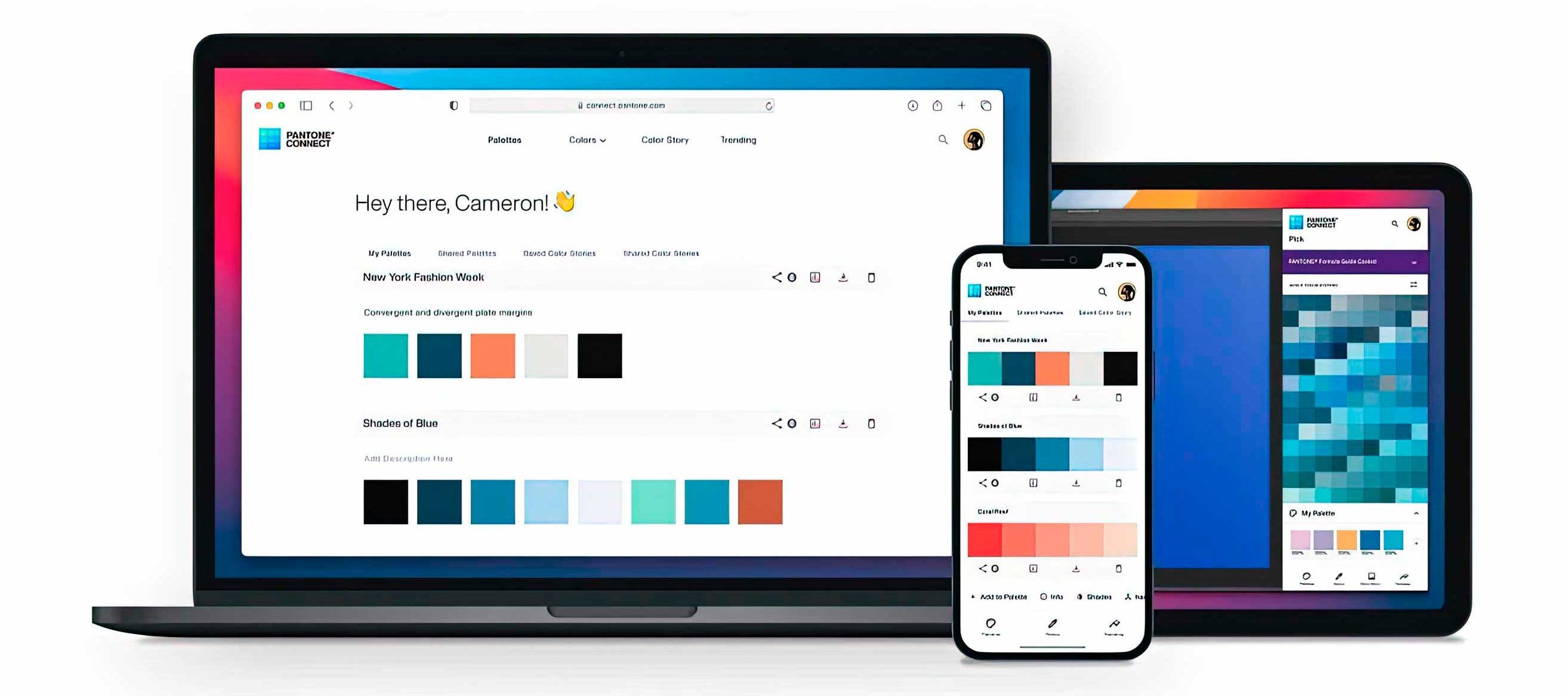
Well, if you own a BenQ Display OR if you buy a new BenQ Display and it’s from their SW or PD range this means as part of BenQ’s Pantone Connect Premium Campaign, you now have One Year FREE access to Pantone Connect Premium which brings benefits to your smart device without the need for cumbersome and expensive equipment like a colorimeter …

Colour is everything … from setting a mood and atmosphere all the way to a feeling and that’s in everything … a movie through to a piece of material and accurate colour and colour that is interpreted correctly.

So what is Pantone Connect Premium

Well basically it enables you to measure and capture colours, be they in digital format or something physical, and by simply using the app you can disvocer what the matching Pantone Colour is from the thousands in their library, discover colour harmonies (i.e. what colours work well with others), create swatches, save them and use them in software like Adobe Photoshop, Illustrator, InDesign and so on …

This makes working with colour so easy and accessible … and doing so quickly!

Smiling bald man in glasses holding up a phone showing a Pantone app beside a monitor

Pantone Premium Connect App open on my iPhone and on my BenQ SW321C Display

Imagine seeing a colour and thinking how you’d like to use the exact same colour in a design, maybe you’re looking to capture the colour grading in the Shadows, Midtones and Highlights from a movie you’re watching on your Display (BenQ of course 😃 ) OR maybe you’re restoring an old photograph and colourising clothing and skin tones. Pantone Connect Premium would enable you to very easily sample colour for the clothing and even better than that, the skin tone that you could then add in.

How do I get Pantone connect premium?

Easy! If you have a BenQ Display from the SW or PD range purchased in recent times OR you purchase a new one, all you need to do is to go to the link below fill in your details, BenQ display serial number and then you’ll receive a code (withing 5 days … although mine came through the same day just a short while later) and then you’re good to go 😃

Oh, also there’s some great videos on the Pantone Premium Connect APP and the Pantone Premium Connect website, there’s some grrat videos on there showing all the what, how, why etc …

Enjoy 😉

Setting up my NEW Workspace

Well if you’re part of my Email Group and connected with me on social media (Intagram, Facebook etc) then you’ll likely be aware that we’ve recently relocated … as in the past couple of days.

We now live in an area that we’ve loved for many years on the Somerset / Devon / Dorset borders with places like Axminster, Lyme Regis and Bridport (West Bay) a short drive away. It’s an area we always wanted to be but Covid times were crazy times and there just wasn’t anything available at the time.

There’s a few other practical reasons for us moving looking ahead to the future and plans with family members staying with us, but on the first morning we woke up, my wife Anne said … “I feel really happy” … and that’s all I need to hear to know we made the right decision.

Anyway, with the move comes a new workspace which I’m now cracking on with …

Three photos of a room filled with boxes, office chairs and furniture before setting up

This morning I’ve installed the Acoustic Panels on the walls and then later in the week will be installing the suspended Acoustic Panel above my desk (once it arrives). It always amazes me how effective these panels are transforming a room with echo and tinny audio into a fantastic recording space.

Better Audio = Better Video for sure 🔊

Three photos of a workspace with monitors, a softbox and dark acoustic panels on the walls

The panels I got from a company called Gik Acoustics ( LINK ) … I’m not affiliated with them whatsoever … they’re products just do as they’re intended and are really well made!

Once the broadband is connected I’ll get back to uploading content on my YouTube Channel; it’ll be 2 weeks since I was able to post and it’s driving me crazy 😜 but with the latest BIG updates in Lightroom and Photoshop for starters there’s loads to share.

Right, best I head back home and get the pain brushes out.

Catch you again soon,
Glyn