adobe

From Movie Magic to Photographic Mastery | Lisa Carney

This is the recording of a live broadcast where I chat with Hollywood movie poster and artwork retoucher Lisa Carney and uncover the how, what and why of her personal work. We talk about her photography, her process and retouching, her travel and her personal projects, including Grief, which is about art as therapy. The recording starts with a slideshow of her images, and then you get to learn how she captures and edits them; I guarantee that, like me, you'll be blown away.

Links mentioned in the video

Website: lisacarney.com (Portfolios, Photoshop Tutorials, Courses and more … )

Grief ( Art as Therapy - Personal Project ) LINK

Instagram: @lisacarney

The Lightroom Virtual Summit 2024: bit.ly/lvs-2024

Glyn’s Adobe Lightroom Community Page: LINK

Unsurprisingly, Lisa was a HUGE hit judging by some of the comments posted already from folks watching the recording …

Screenshot of viewer comments praising a video interview
Red Notice film poster with two men in suits and a woman in a red dress
Black and white portrait of two smiling older women seated together
Misty lake shore at golden hour with rocks in the foreground and trees fading into haze
Older woman in a patterned sari seated on a chair in front of a colourful shop
Split level view of a turquoise sea below the surface and clouds above

Editing my Photographs in Lightroom on my iPad Pro

Now that I’ve been able to calibrate the screen on my iPad Pro, I’m really enjoying it when from time to time I retouch some of my pictures on it; reason being that the results on my calibrated iPad Pro are extremely close to how they look on my calibrated BenQ SW 272U Display.

I always struggled taking it seriously before now because it wasn’t calibrated and thought …

“What’s the point when I’d then have to go and make corrections
in Lightroom on my desktop afterwards?”
— Me (Before)

But now this is definitely not the case …

Desk with a BenQ SW272U monitor and an iPad Pro both showing a sunset photo in Lightroom

I actually had the technical folks at Calibrite reach out to me after having seen the iPad Pro calibration video I shared on my YouTube channel, asking if I’d be able to do a 2nd calibration to check whether the one I did was indeed accurate; and it most definitely was …

  • Target Luminance = 100cd/m2

  • Achieved Luminance = 99.355cd/m2

  • Target X = 0.3127

  • Achieved X = 0.313

  • Target Y = 0.3290

  • Achieved Y = 0.331

So yeah … the calibration of the iPad Pro screen worked a treat!

If you didn’t see the video I put together showing how to calibrate the iPad Pro and whaich also makes sense of what all this Luminance, X and Y stuff is all about, here it is …

So now, knowing that my iPad Pro screen calibration is good, I’m definitely making more use of it; not for every edit but just for those times when I just fancy sitting with my feet up in front of the TV and tinkering and when out and about on a phot shoot and then grabbing a coffee.

Also on those occasions if I haven’t finished the editing, when I get back home in front of my main computer I can just pick up in Lghtroom on my desktop from where I got to in Lightroom on my iPad Pro; such is the way that Lightroom syncs across all devices.

Clever stuff!

Actually on the subject of getting home and diving back on to my main computer, I’ve some new kit coming that is going to improve my workflow, set up and backing up, so I’ll make sure to share about that here and in a video 👍🏻

💥 Solving a LIGHTROOM Preset Headache ( Lightroom and Classic )

The Adobe Lightroom Community is a great resource for Lightroom presets, but how do you actually get them? How do you install them, and how do you get them into Lightroom and Lightroom Classic? It can be a bit of a headache if you've not done it before, so in this short video I show exactly what you need to do, step by step, for both versions of Lightroom.

Here’s the link to the Adobe Community PAge where you’ll find the Preset that I’ve made available:

https://lightroom.app.link/B4mq80BlSIb

Download my Minimal Teal and Orange Preset for Lightroom and Camera Raw

If you’re a Lightroom Classic , Lightroom or Photoshop / Camera Raw user ...

I have just added the finishing touch steps that I used on the recent portrait of my friend Steve Healy onto the Adobe Lightroom Community Page so that you can save as a preset, download and install to use ... and adjust settings to taste.

Just use this link: https://lightroom.app.link/B4mq80BlSIb

Low-key portrait of a bald bearded man in Lightroom with a preset panel open

KelbyOne Lightroom Conference Coming in April 2024

Very excited to be part of the KelbyOne Lightroom Conference 2024 this coming April 16th and 17th …

I’ll be presenting 2 classes, both of which are connected in that the first class I show all the preparation, planning, lighting and photogtraphy for a photo shoot. So, I’ll be covering the researching the concept, visiting a clothing and props provider to the TV and Movie Industry, working with the model, stylist, the set and finally the shoot.

In the 2nd class I’ll then go through the entire retouching process from importing the cpatured images into Lightroom and then step by step working through the retouching making use of Lightroom and Photoshop, and then finally a print.

VERY excited to show this becuase it means working on something completely new; a portrait that doesn’t form part of a series but a portrait I’ve wanted to work on for a while, so to be able to show the entire process will be great!

To find out more about the Lightroom Conference and to take advantage of Early Bird pricing, click / tap on the button link below.

PHOTOSHOP Zoom GONE CRAZY ??? TRY THIS QUICK FIX

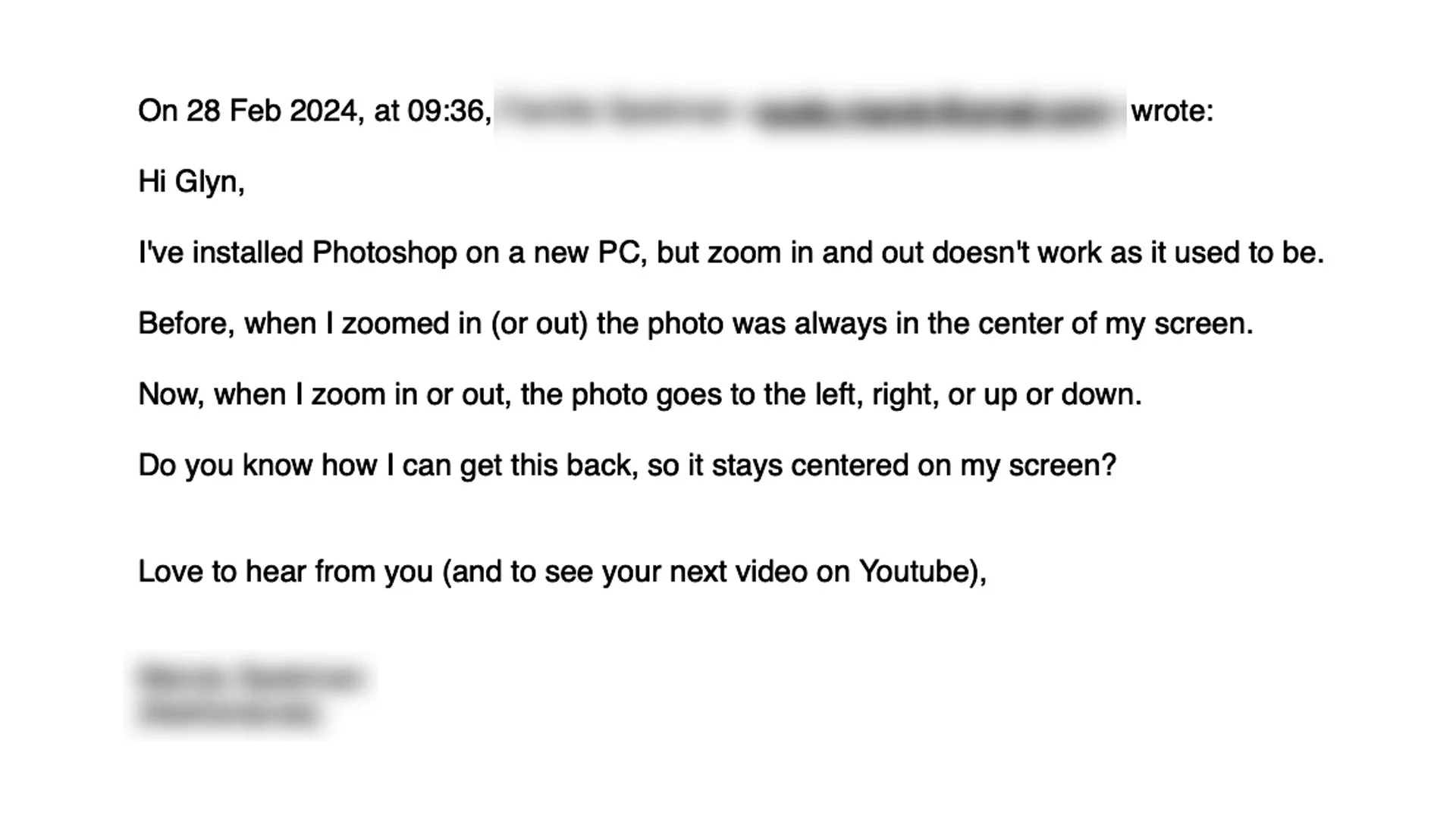
Email from a viewer asking why Photoshop zoom no longer keeps the photo centred, sender details blurred

Sometimes, when Photoshop gets an update, you might notice a few things behave a little differently, and one of those can be zooming in and zooming out. After receiving an email from someone whose zoom had started acting strangely, I put together this quick video to show the fix, so if zooming in Photoshop has gone a bit crazy for you, this should get it back to behaving as it should.

YOUR PRESETS 💥 NEW in PHOTOSHOP UPDATE 25.5.0

Photoshop 25.5.0, released in February 2024, brought the ability to create your own adjustment layer presets, and to export and import them too. In this video I show how to save an adjustment layer as a preset so it's ready to use again whenever you need it, and how exporting and importing them means you can back them up, move them to another computer or share them with others.

QUICK TIP: Multiple Selections in Photoshop

How to make multiple selections of the same fixed shape in Photoshop is something I get asked about quite often, so I put together this very quick video to show how it's done. Rather than drawing each selection by hand and trying to match the size every time, you'll see how to keep the shape fixed and add as many selections as you need.

🏳️‍🌈 QUICK COLOUR GRADING technique using ONE ADJUSTMENT LAYER

Colour grading doesn't have to mean stacking up lots of layers. In this quick Photoshop technique I show how to use just one adjustment layer, Selective Color, to colour grade your images and add the classic teal and orange look. It's a single layer doing all the work, which keeps things simple and quick, and because it's an adjustment layer it sits above your image rather than changing the pixels themselves, so you can go back and tweak the look whenever you like.

Is LIGHTROOM the FUTURE WORKFLOW for PHOTOGRAPHERS???

In this recent LIVE Broadcast which went out on YouTube and Facebook, I chatted with Brian Matiash about Lightroom (known affectionately as the Cloud Version) and how it has changed fairly recently introuding local storage in addition to cloud storage.

Brian is an early adopter of using Lightroom exclusively for his workflow so I thought it would be good to hear what the potential workflow would mean and what switching to Lightroom would mean for someone like me that is a Lightroom Classic user.

There were already a few things I knew weren’t in Lightroom, which probalby out of all of them were the reason I hadn’t started using it ‘in anger’ , but up until fairly recently it was the fact that it was purely a cloud based storage workflow …

Lightroom graphic listing missing features: no printing, PNG export, layers, swatches, tethering, slideshow

Brian did a great job talking through the ‘cloud-only’ workflow ; a workflow that would definitely suit some people, so that was great to see; it isn’t a workflow for me however, but then workflow is very much a personal thing.

With cloud-only comes the issue of the amount of storage and the cost of that storage, which in my opinion at the moment, Adobe’s pricing is a bit on the excessive side … especially when you kind of compare it to something like the cost of BackBlaze BackUp with unlimited storage costing me $84 or pretty much £66, for the year!

I’m also one for keeping all the layers in files and keeping hold of images I don’t use and at the moment I currently have around 6TB of data.

There’s also internet speed to consider.

If I was to go out and shoot a portrait with my 61MP Sony A7RIV, I could potentially end up with quite a few images which from that camera would mean a considerable amount of data.

Uploading this to the cloud would be ok if I was at home as we do have very fast 1Gb Broadband, BUT anything less than this would take a considerable amount of time. I couldn’t and wouldn’t go cloud only, but would instead use the local storage as I do now and only sync my ‘keepers’ in a portfolio on the cloud.

However … this I already do with Lightroom Classic.

All of my image files are on Hard Drives and I have several portfolios as Collections which are synched with the cloud meaning I can view them on my iPhone, my iPad … or even another computer.

The conversation with Brian and seeing the Lightroom workflow I genuinely found interesting and educational BUT for me, certainly for now, unless Lightroom functionality with what I mention above and other stuff that was mentioned by others watching LIVE yesterday and have commented since, were implemented.

That said … just giving Lightroom Classic a bit of a face lift and making it a bit quicker would make me happy.

But, if I’m being totally honest … I don’t get why 2 separate versions were made in the first place.