
photography

The Backgrounds I use when Capturing Portraits

I’m often asked what backgrounds I use when taking portraits, and then when I say, I’m then asked which of the material choices I opt for.
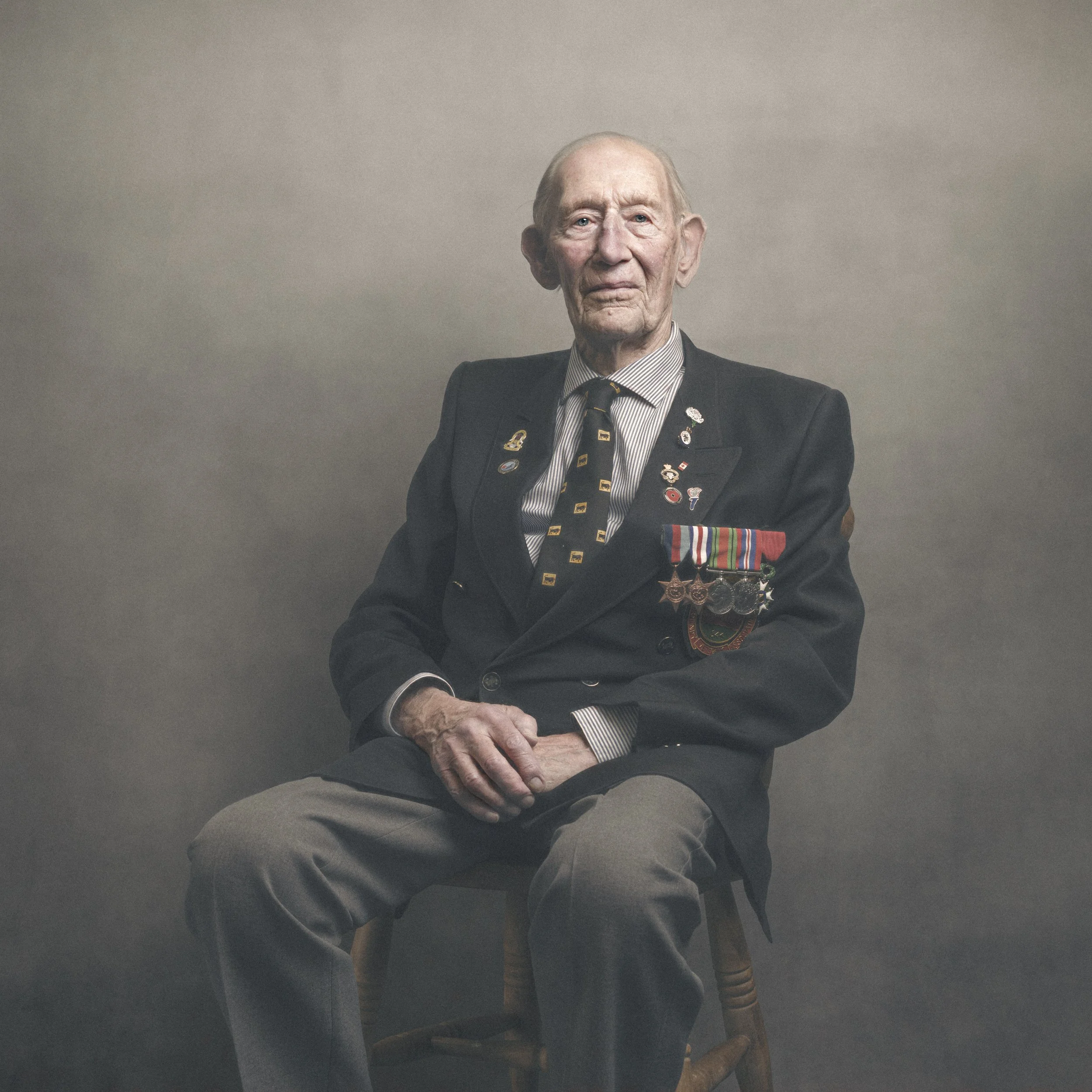
WW2 Veteran Geoffrey Pulzer ( 29th Armoured Brigade , 11th Armoured Division )

Up until recently when Westcott released the Pro version of X-Drop Background Support System, there was just the choice of Canvas or Vinyl, and I ALWAYS opted for the Canvas.

Although not actually canvas, but rather a canvas effect, the material choice is way better as it doesn’t have any shine to the surface at all so you don’t suffer with hot spots when using lights.

So, Canvas was and is always the choice I go for.

Now though, with the introduction of the X-Drop Pro things have defintiely upgraded.

The X-Drop has always been a VERY portable system however if you opted for a background other than the washable material, the backgrounds themselves came in a long cardboard tube and that’s how they had to be transported.

Not now though with the X-Drop Pro as this also introuduces a new material background; the same VERY popular backgrounds but now in a machine washable material meaning you can fold it down making it very small, and like the X-Drop Pro Support Stand, VERY portable.

CLICK / TAP for my ‘glyn dewis’ background range

The new X-Drop Pro Backgrounds also come in a larger size so as well as the 5’ x 7’ , there’s also 8’ x 8’ … and you can use the X-Drop Pro Support Stand for both!

So, 5’ x 7’ is the one I use the most becuase it’s a great size forusing when not in a studio, and I use the new X-Drop Pro material version because it makes the whole background so incredibly portable.

Here’s Brnadon from Westcott showing the X-Drop Pro and how to easily fit the new foldable and washable X-Drop Pro Backgrounds …

CLICK / TAP for my ‘glyn dewis' background range

Hope that helps,
Glyn

Note:
For folks in the UK,
Carmarthen Cameras are the Offiical Westcott Stockist / Supplier, so if you give them a shout, ask for Krish … a great guy and a great friend!

How I PHOTOGRAPH and EDIT an ICONIC LANDSCAPE using my iPhone and iPad (LIGHTROOM MOBILE)

How I PHOTOGRAPH and EDIT an ICONIC LANDSCAPE using my iPhone and iPad (LIGHTROOM MOBILE)

Here's a COMPLETE MOBILE WORKFLOW showing how I photographed and Edited the iconic Prince of Wales Bridge using just my iPhone and my iPad. I am BLOWN AWAY by the qulity of the file produced and the print which could easily be A2!!! Exciting times in Photography!

Sony A7RV - I WAS WRONG !!! 😳 User Review + RECOMMENDED SETTINGS for BIRD PHOTOGRAPHY 🦅

I was WRONG!

Here's the correct review of the NEW Sony A7RV along with recommended settings for photographing Birds that made a BIG DIFFERENCE! Plus the camera finally has Focus Bracketing, a Flip / Tilt Screen AND Artifiical Intelligence!

But would I buy it? 🤔

MIND BLOWN 😲 Mobile Phone Photography + LIGHTROOM MOBILE and PHOTOSHOP on the iPad

Taking photographs and editing on a mobile device is incredibly exciting and such a fantastic workflow.

In this video I show you the whole process from capture the long exposurephotographs with my iPhone, to then editing in Lightroom Mobile and Photoshop on the iPad and ending up with a FANTASTIC print.

iPhone Long Exposure at Durdle Door, Dorset

Headed down to Durdle Door in Dorset the other week; just over an hour away so not a long drive, but wow … what a great place.

I met up with my friend Steve Healey with the intention of photographing the sunrise but lack of local knowledge put a stop to that. Little did we know that there’s a gate preventing access that doesn’t open until 9am BUT you can take a short coastalwalk from nearby Lulworth Cove to access the beach and the famous arch … didn’t know that until later in the day though.

Still, we drove off for a while to grab a coffee and came back an hour or so later and got down to take some photographs; Steve with his Fuji and me with my iPhone and SmallRig combo.

Here’s my favourite; a 5 second long expsoure that was taken using the Lightroom Mobile App camera and a quick edit in Lightroom CC and Photoshop …

HOW I made these PORTRAITS: Complete Workflow including PHOTOGRAPHY, LIGHTROOM and PHOTOSHOP

In this video I cover EVERYTHING that I did to create these Portraits including: KIT , SET UP and RETOUCHING in Photoshop and Lightroom …

Here’s a list of all the kit I used to take the portraits, which you’ll also find on my GEAR Page …

  • Westcott FJ80 II Speedlite

  • Westcott FJ-X3 Remote Trigger

  • Westcott Rapid Box Switch Beauty Dish

  • Westcott 32” 2-in-1 Reflector

  • Westcott X-Drop Poro Background Support

  • Glyn Dewis Vintage Grey Canvas (for X-Drop Pro)

Long Exposure Sunrise with my iPhone and Lightroom Mobile

This Mobile Phone Photography is addicitve!

A couple of weeks back I headed over to West Bay, Dorset to meet up with my friend Steve Healy and to catch the sunrise.

Taking only my new iPhone 14 Pro Max and SmallRig Univeral Holder, whilst Steve shot away with his Fuji XT-5, I shot using the Lightroom Mobile App and experimented with the long exposure settings.

This is my favourite from our time there before the rain came down and stopped play; still … we were recommended a great café the round corner so alls well that ends well 😃

West Bay, Dorset

iPhone 14 Pro Max
Lightroom Mobile App Camera (Long Exposure)
Edited in Lightroom Mobile on iPhone and iPad

DO THIS for PERFECT COLOUR 🌈 in your PHOTOGRAPHS

Perfect, Accurate Colour is vitally important in both Photography and Video.

In this short video I show how to use the Calibrite ColorChecker Passport Duo to achieve exactly this; a simple process that involves 1 extra photograph and just a few clicks in Lightroom …