Most people think of Generative Fill in Photoshop as a way of adding objects, but it's also smart enough to match the lighting and shadows already in your photo. In this video I show how it blends new elements, such as hair, into an image while keeping the light, shadows and perspective looking realistic. I then put it to work on a Viking composite, including a different way of approaching the hair selection, so you can see how it all comes together on a more involved image.
Discovering the HOW, WHAT and WHY for creating STUNNING HDR Images | Greg Benz
This is the recording of a live broadcast where I chat with photographer Greg Benz, who's very much the go-to person when it comes to HDR. We talk through the how, the what and the why of creating high dynamic range images, and just as importantly, how to display them so they're seen the way they're meant to be. If HDR is something you've heard about but never quite got your head around, this conversation covers what it is, why it's worth considering and how to go about making stunning HDR images of your own.
links mentioned in the video:
Greg Benz Website: www.gregbenzphotography.com
Greg Benz on Instagram: @gregbenzphotography
Web Sharp Pro Software ( Create + Display HDR Images ) : ( LINK )
NEW in PHOTOSHOP Beta 💥 PEOPLE SELECTIONS are getting QUICKER AND EASIER
Selections in Photoshop are getting quicker and easier, and in this video I look at what was in the Photoshop Beta at the time. Not only is there Select People, but there are also attributes you can choose from, including items such as upper clothing, lower clothing and accessories. It means you can pick out a specific part of a person with very little effort, rather than building the selection by hand.
The ART and INSIGHTS of PROFESSIONAL PORTRAIT RETOUCHING | Pratik Naik
This is the recording of a live broadcast where I chat with professional high-end portrait retoucher Pratik Naik. We talk about his process, his tips and techniques, where he sees the future of retouching and what it takes to get hired, along with a whole lot more. It's a great insight into the art of professional portrait retouching from someone who does it at the very highest level, and there's something in it for anyone who retouches portraits, whether for clients or for themselves.
links mentioned during the video:
Pratik’s website: solsticeretouch.com
Pratik’s Retouching Course “The Retouching Series” : ( LINK )
Instagram: @solsticeretouch
How to Print course: ( LINK )
Slideshow of Pratik’s work for his Guest Appearance:
The BEST way to LEARN PHOTOSHOP 💥 Combining Tools, Techniques and Fun
For me, the best way to learn Photoshop is by combining multiple tools and techniques to see how they work together and complement each other. In this video you can follow along as I take an out-of-camera photograph of a supercar and turn it into something completely different. It's less about any one tool and more about how they build on each other, and having some fun along the way.
Becoming a Fine Art Photographer and Master of Monochrome | Vincent Versace
This is the recording of a live broadcast where I chat with fine art photographer Vincent Versace, a Nikon Ambassador and recipient of the Computerworld Smithsonian Award in Media Arts and Entertainment. Vincent is a master of monochrome, and we talk about life as a photographer, finding your own style, the art of post-production and more. There's a lot here for anyone interested in fine art photography or black and white work.
links mentioned in the video:
Vincent’s Website: versacephotography.com
Vincent on Instagram: @vincent_versace
Vincent’s Workshops: versacephotography.com/workshops
DON'T FORGET the BACKGROUND ERASER TOOL in Photoshop 💥
The Background Eraser Tool is easy to forget about in Photoshop, but it's incredibly powerful when you're compositing glass objects. In this video I show how it keeps the shape and the highlights of the glass intact as you remove the background, which can be really tricky to do any other way. If you ever composite glass or other transparent objects, it's a tool well worth remembering.
Ragnar - Viking Composite using Photoshop
Following on from the earlier article I wrote ( LINK ) showing the Behind the Scenes of a recent Viking Photo Shoot, I’ve now finished the 2nd image so thought I’d share it here for you to see …
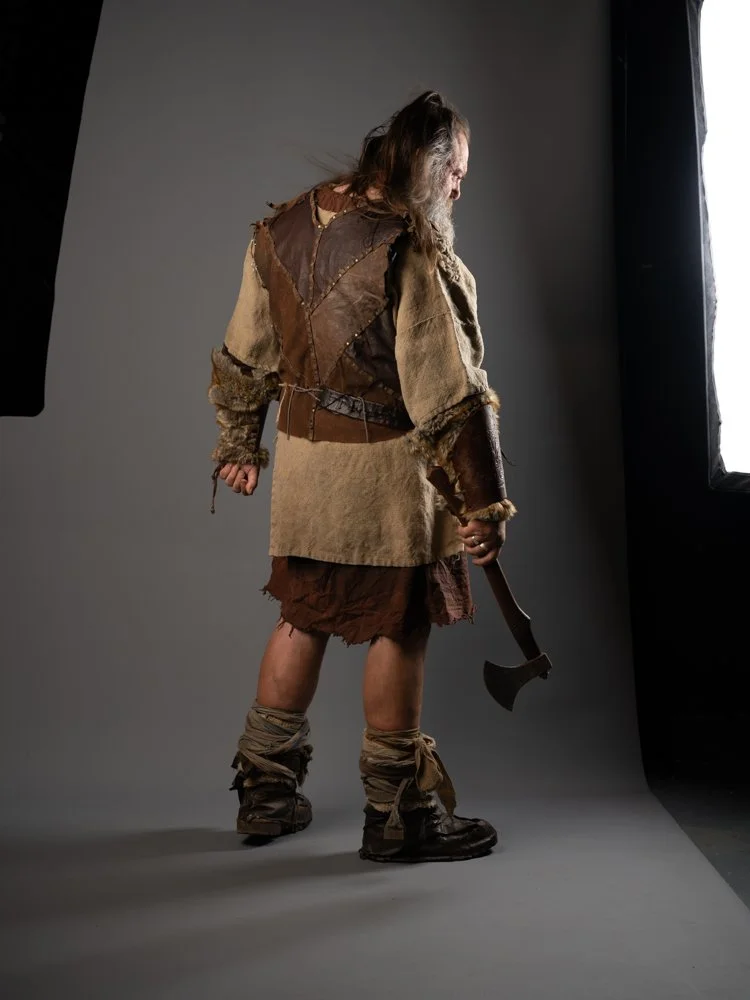
This is a composite made using Photoshop and is a combination of several images comprising the original studio photograph of my friend Simon ‘Foxy’ Fowler dressed as the Viking, the Location Shot and several Sea Bird Photographs.
Here’s the studio photograph of Simon …
Here’s the location shot which is a part of the coastline at Three Cliffs Bay, The Gower, South Wales …
To make sure that I got the angle and height correct, when at Three Cliffs Bay, my great friend Anthony Crothers stood in the spot where I would eventually place Simon …
In the studio when photographing Foxy, my camera was on a tripod and at a height where the lens was in line with the top portion of his nearest thigh.
When on location photographing the background / scene, Anthony was stood on a rasied area of ground …
(Note: it looks precarious but actually isn’t … to the front of Anthony on the other side is a flat area that you can comfortably walk on)
… so to get the angle / height to look as though Simon was photographed higher than he actually was, the camera lens was level and aimed just below Anthony’s nearest knee.
My new compositing workflow
Returning to some compositing has seen me now approach them in a different way especially when it comes to potentially time consuming cutouts such as hair anf fur.
My new workflow sees me leaving this part to the very end and getting great results in literally a fraction of the time …
This is something that I’ll definitely be going through in my Combining Old and New : Mastering Selections and Cut Outs in 2024 class in the upcoming ( FREE ) Photoshop Virtual Summit 6 …
If you’d like to see a larger version of both images created from this photo shoot, I’ve now added them into my PORTRAITS PORTFOLIO ( LINK )
Thanks for looking in,
Glyn
Capturing and Creating FINE-ART DREAM-LIKE IMAGES of the LANDSCAPE with Enrico Fossati
This is the recording of a live broadcast where I'm joined by fine art landscape photographer Enrico Fossati to go behind the scenes of his process for capturing and creating such incredible, dream-like images of the landscape. We talk about how he approaches both the capture and the retouching, and the artists who inspire his work, from fantasy illustrators such as John Howe, Alan Lee and Ted Nasmith to painters including Albert Bierstadt, Thomas Cole, Caspar David Friedrich and William Turner.
*Use Discount Code: GLYN24 for €30 Euros OFF (valid until 30th September 2024)
Enrico on Instagram: @enrico.fossati
Enrico on Facebook: enricofossatiphotography
Enricos’s Inspiration
Fantasy Illustrators:
John Howe , Allan Lee, Ted Nasmith, Les Edwards, Frank Franzetta,
Painters:
Albert Bierstadt, Thomas Cole, Edwin Church, Caspar David Friederich, William Turner … and many more
My How to Print Course: ( LINK )
MASTERCLASS in using LAYERS , BRUSHES and LAYER STYLES in PHOTOSHOP with Bert Monroy
This is the recording of a live broadcast where, by popular demand, we welcome back the incredible talent that is Bert Monroy. Bert takes us step by step through how to get the most out of layers, brushes, layer styles and more in Photoshop, and it really is a masterclass. Seeing how someone with his experience approaches these everyday tools is a great way to understand them better, and to see just how much they can do.
links mentioned in the video
Bert Monroy’s Website: bertmonroy.com
Bert Monroy’s YouTube Channel: youtube.com/bertmonroy