adobe

IT DOESN'T GET EASIER THAN THIS 🥹 Mobile Photography and COMPLETE Editing Workflow
This is the recording of a YouTube live broadcast where I went through the complete mobile workflow for a seascape long exposure, from capture through to the finished retouch. I took the photograph with my iPhone 14 Pro Max using the ReeXpose app, and then edited it in Lightroom and Photoshop, showing each step along the way. I also talked about some of my wishes for the iPhone 15 Pro Max, whatever it ended up being called, and how a change to USB-C, which I was hoping for, would make a huge difference to the mobile workflow, especially when travelling and away from good internet speeds.

Fixing Hair and Fur with Photoshop Generative Fill AI + when NOT TO USE IT 😳

Hair and fur can be some of the most awkward things to fix when you're editing, and Photoshop's Generative Fill AI can be a real help with them. Here I show how to use Generative Fill to fix hair and fur, but just as importantly I also look at when not to use it. For those times when it isn't the right tool for the job, I go through how to fix things manually instead, so you've got both approaches to choose from depending on the image in front of you.

😲 PERFECT SELECTIONS and CUT-OUTS with Photoshop A.I. (Generative Fill)

Making selections and cut-outs of hair and fur has always been one of the more challenging jobs in Photoshop, and it's often where an otherwise good cut-out falls down. Here I show how Photoshop's Generative Fill AI changes everything when it comes to those tricky areas, helping you get much cleaner selections and cut-outs of hair and fur than you'd manage with a selection on its own.

YouTube LIVE: Make Movie Poster Portraits using Photoshop and A.I.

This is a YouTube live broadcast from Sunday 13th August 2023, where I go through how I created a movie poster style portrait of my friend Dai O'Toole. I cover the lighting first, and then the editing in Lightroom and Photoshop, including selections, cut-outs and special effects, along with how AI fits into the process. It's a complete look at what goes into making a movie-style portrait, from the way the light is set up through to the finishing touches in Photoshop.

TRY THIS 🔥 How to FIX SKIN TONE in Photoshop ... FAST

Following on from a recent live broadcast, here's a step by step technique for fixing skin tone and colour problems in Photoshop quickly and easily. It's based on frequency separation, and I go through each stage so you can see exactly what's happening and why, making it straightforward to even out problem areas of colour on skin without spending ages on it.

How to IMPORT PRESETS ... FAST 🔥 ( Lightroom + Camera Raw )

This one's short and sweet. If you've picked up some presets and want to start using them, here's how to import them quickly and easily into both Lightroom and Camera Raw. I go through the process in each so you can see exactly where to go and what to click, which means you can have your presets installed and ready to use on your photographs in no time.

Lightroom Mobile iOS gets a July 2023 UPDATE

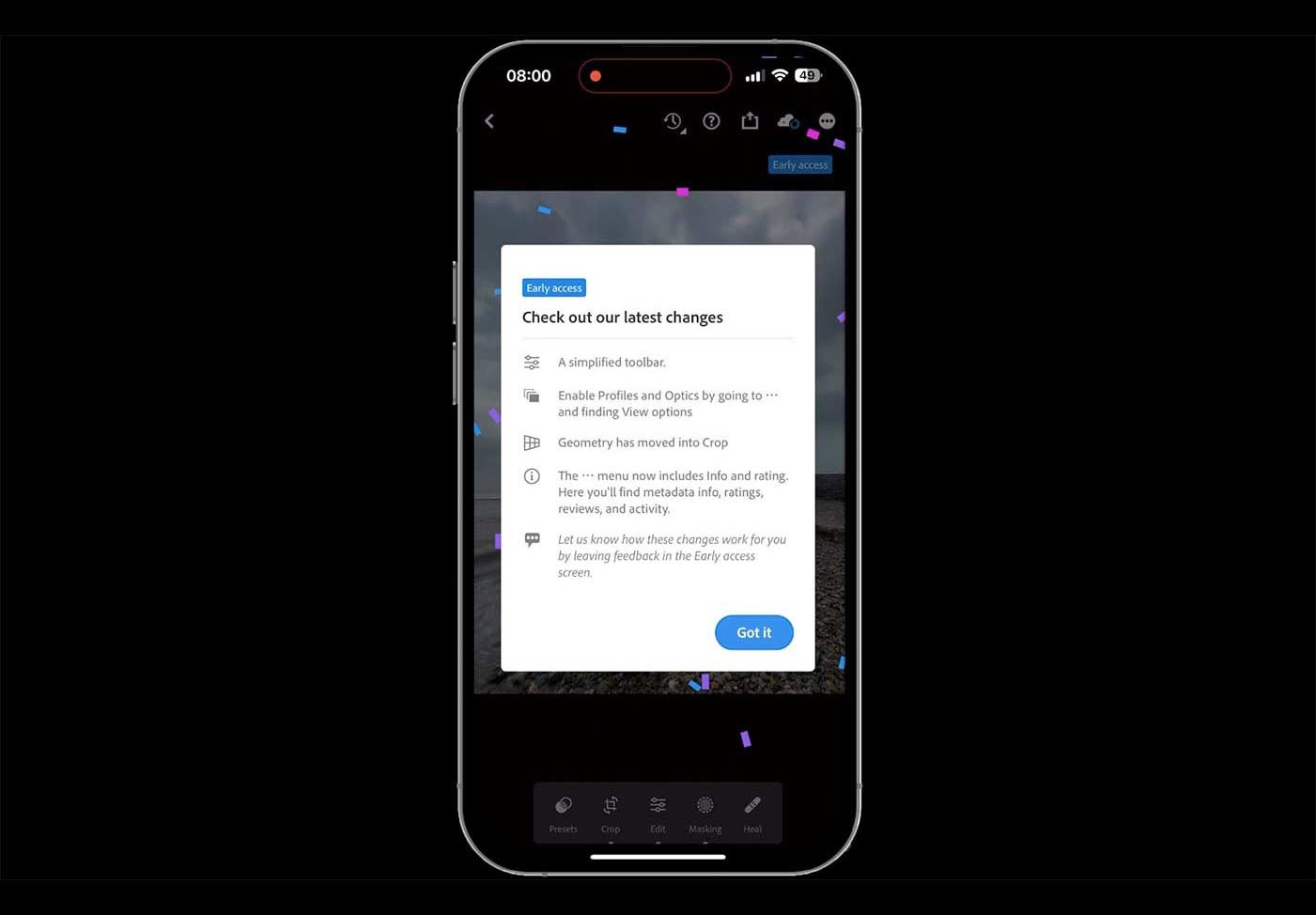
Adobe released an update to Lightroom Mobile for iOS in July 2023, taking it from version 8.4.0 to 8.4.1. The main thing it brought with it was Early Access Preview, along with a much improved editing tool bar and workflow. This is a quick run through, under a minute long, showing what the update brought and how the changes to the tool bar make editing on your phone that bit smoother.

( YouTube LIVE ) DRAMATIC Stormy Sea Capture + Retouch: Complete Mobile Workflow

This is the recording of a YouTube live broadcast from Thursday 20th July 2023, where I go through the complete mobile workflow for a dramatic stormy sea photograph. It starts with the capture on my iPhone and then moves through all of the editing steps in Lightroom and Photoshop Beta, including how I made use of Generative Fill AI along the way. It's the whole process from start to finish, so you can see how a phone capture can be taken all the way to a finished, dramatic image.

GENERATIVE FILL A.I. in Photoshop performs Magic changing furniture! MIND BLOWN 😳

This one blew me away. I was playing around experimenting in Photoshop one evening and discovered that Generative Fill AI in Photoshop Beta is able to change furniture, even furniture that has people sitting on it. Here I show it in action, swapping out the furniture while leaving the people in place, and how it blends the result in perfectly in a matter of seconds. It's a great example of just how much this technology can do.

Transform Photographs into Stunning Paintings or Sketches with Photoshop's Generative Fill A.I.

This is a fun one. There's a little trick you can use with Generative Fill AI in Photoshop Beta to transform your own photographs into paintings and drawings, and here I show how it works. With it you can turn a picture into an oil painting, a watercolour, a pencil sketch and more, all from the same starting image, which makes it a really enjoyable way to experiment and see your photographs in a completely different light.