Here's a great way to use the Masking Section in Lightroom and / or Camera Raw for adding Realistic Light into your pictures AND how to create an Intelligent Preset to do it on ANY PICTURE with just 1-click
BenQ Webinar: Thank you for the kind words!
Thank you to everyone who registered for my webinar last night in partnership with BenQ
An incredible amount of people registered and we had great numbers viewing live, and waking up today to some wonderful comments has been the icing on the cake!
Bloominβ love doing what I do and getting to share it with others π
Thank you!
How to make the DARK and MOODY PRESET in Lightroom (and Camera Raw)
The Dark and Moody look is extremely popular at the moment especially on social media; it's a great look that can add drama and impact to your pictures.
Here's how I create it and how to make it as a preset so that you can quickly and easily use it again and again in Lightroom Classic, Lightroom CC, Lightroom Mobile and Camera Raw.
THANK YOU Carmarthen Cameras, BenQ and Permajet
Last Friday I was in Carmarthen, Wales at Carmarthen Cameras for my Pro Printing Seminar β¦
β¦ a 2 hour evening going through the complete printing process covering how to correctly calibrate your display / monitor for printing , printing software , paper choice and of course making some prints.
HUGE thank you goes to the great folks at Carmarthen Cameras who always pull out all the stops to make events run smoothly, and also to the incredible support from both BenQ and Permajet.
Kicking off going through the display calibration , I was using a BenQ SW240; a 24β hardware calibrated display using the BenQ Palette Master Software
To calibrate the display I used my X-Rite i1 Display Plus Calibration device (which is now the Calibrite Colour Checker Display Plus) β¦
So often weβre advised that for the best possible results you only need to use these (generic) settings but I never seemed to get the results I expected , so it was great to get the opportunity to go through explaining the settings and how to fit them to βyourβ enviroment; when you know what each setting is , it makes this process so much easier and understandable.
I then covered printing software mainly looking at using Lightroom and also the Canon Pro Print Layout Software ; both work great although I do prefer the no frills interface of the Canon Software β¦
First of all showing how to print on Canon Paper using the Canon Pro 300 and then using a range of papers, from Permajet including their NEW Heritage Range , and showing how to use their Generic Paper Profiles β¦ which never fail to produce fantastic results !
Again , a HUGE thank you to everyone involved and who came along on Friday making it such an enjoyable evening; It was great to run though βin personβ just some of the content I have recorded for inclusion in my Printing Class that will be available this April.
BEST software for FIXING BLURRED / OUT OF FOCUS portraits
Not something you ever want to use but damn useful when you need to!
In this video I try out 3 different software / plug ins to fix a blurred / out of focus portrait ... Luminar Neo, On1 NoNoise AI 2023 and Topaz Sharpen AI ... and the winner produces an insanely good result!
Creative Portrait Retouching Techniques Webinar with BenQ
On Wednesday 1st March 2023 (that's next week already ) at 6pm UK I'm doing a LIVE Webinar in partnership with BenQ, going through some Portrait Retouching Techniques in Lightroom and Photoshop + Q&A
This is a FREE 1 hour long webinar also allowing time for Q&A, so if you fancy joining me just use the link below to register and get the link as spaces for the βvirtual roomβ are limited.
Plus anyone who registers, will also receive a link to the recording of the webinar the following day so that they can watch it later.
Hope to see you there π
Glyn
How I Lit and Photographed this Portrait of a Female Attendee
A couple of weeks back I was in Stoke on Trent presenting at the Guild of Photographers Event on behalf of Sony.
Kicking off first thing I hosted a workshop for a limited number of 10 people ( although 11 were there π€£ ) and went through how I set up and light portraits but more importantly how I interact and help subjects in front of the camera to relax.
I love sharing this kind of stuff; stuff that I learned mainly from when I was full-on photographing World War 2 Veterans for my 39-45 Portraits Project. These portraits were of people who maybe werenβt so keen initially on being photographed or felt self conscious in front of the camera as opposed to me photographing models.
No eye tracking, sharpness, dynamic range or whatever will help with this.
Anyway the reason for this was mainly to share one of the portraits I took when showing a lighting set up that is incredibly simple but so incredibly effective.
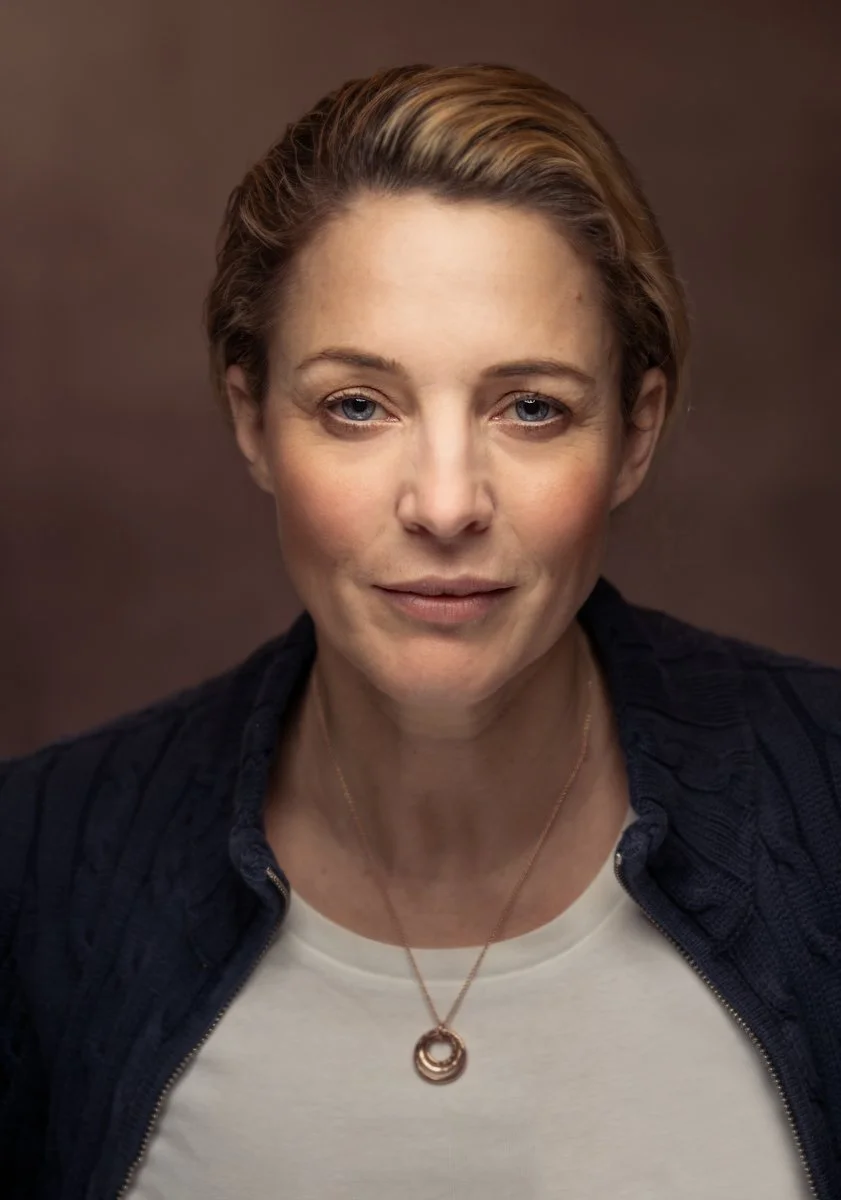
I only took one photograph but this is the result; a portrait of workshop attendee & Photographer Jo Bullas β¦
And hereβs a Behind the Scenes photograph showing the set up I used however in this one Iβm now holding the light for one of the attendeesβ¦
KIT USED
Aside from my camera ( Sony A7RIV with the 85mm G-Master Lens) , this is all the kit I used for this portrait β¦
If you saw an earlier post youβll recognise the set up as being the same as when I photographed my friends Ian Munro, Anthony Crothers, Dave Clayton, Brian Dukes and Gerwyn Williams; I even jumped in front of the camera too β¦
The difference this time was simply down to a camera setting using a wider aperture and a slightly slower shutter speed to allow more ambient β natural light into the shot.
Anyway if you didnβt see the original video I shared on my YouTube Channel going through exactly how I do this, Iβve shared it below.
Enjoy,
Glyn
TRY THIS π₯ The INVISIBLE BLACK BACKGROUND (Photography Technique ... UPDATED)
Here's a SIMPLE and VERY EFFECTIVE technique for creating a Black Background behind your subject when you don't have one ... indoors or outdoors using just your camera and one flash!
This is my UPDATED Invisible Black Background Technique v2.0 π π·
π¬ ππππππππ ππ ππππ πππππ
00:00 - Introduction
00:40 - Kit Needed
00:55 - Shutter Speed Flash
01:31 - High Speed Sync
01:52 - Camera Settings
02:50 - Aperture + Flash
03:37 - Turn on HSS
04:12 - Turn on the Flash
04:46 - Options
05:25 - Recap
06:05 - The Problem with HSS
06:29 - Why not use a Neutral Density (ND) Filter?
07:46 - Dealing with Reflections
PRINTING MAKES YOU A BETTER PHOTOGRAPHER
Not the main video I'm working on for this week, but thought it worth sharing ESPECIALLY if you like printing your images.
Check out the A3 print of an iPhone Photograph at the end too ... Exciting Times!
The iPhone Photography Conference
It's all GO!!! ... π
For the first time ever I'm one of the instructors presenting a class for the upcoming iPhone Photography Conference on the 28th and 29th March 2023.
For my class I'm heading somewhere special that I've never been before and will be going through everything I do to capture photographs on location, editing using the mobile workflow and then printing.
For more information and tickets use this LINK